This guide explains how to handle additional requests in Potion Craft, such as extra effects or specific ingredient requirements requested by customers.
Use this guide to help with your playthrough.
What Are Additional Requests?
As the game progresses, customers will start adding special requests to their potion orders.
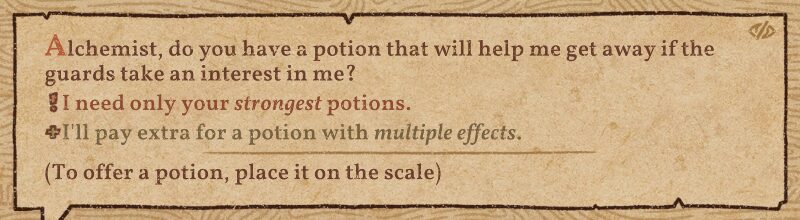
The exclamation mark (!) indicates a mandatory condition. If this requirement is not met, the customer will not buy the potion, even if the main effect is correct.
The plus sign (+) means “if possible.” Meeting this condition increases the selling price, but the potion can still be sold even if it is not fulfilled.
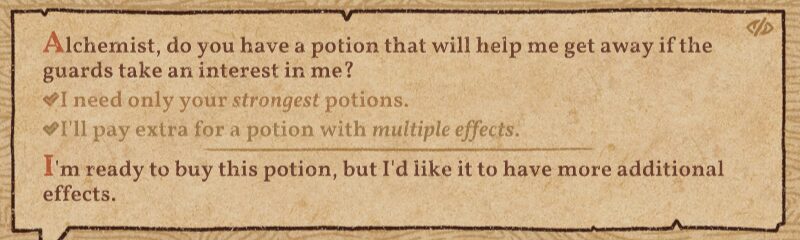
When a potion that meets the additional request conditions is placed on the scale, check marks will appear as shown in the image above, making it easy to confirm.
Adding Required Ingredients Is Very Simple
Requests that say “Please add ○○” can be handled by opening the potion’s recipe and resuming it with “Continue Brewing From Here”.
Simply add the specified ingredient to the Cauldron and finish brewing to complete the request.
Additional Requests Do Not Always Need to Be Fulfilled
At times, additional requests may feel overly demanding or not worth the effort. In such cases, it is perfectly acceptable to end the conversation and decline the order.
While Popularity and Reputation will decrease slightly, a single decline can usually be recovered through subsequent customers. The talent skill [Charisma] can also reduce the amount of Popularity lost.
Orders that are not worth handling can be safely ignored without causing major issues.
Optimize Recipe Saving
“Please add ○○,” “A weaker effect is preferred,” or “At least ○ types of ingredients”
There is a way to save recipes so that all of these requests can be handled from a single recipe page.
This method involves saving the recipe in an unfinished state, aligned with the Level III frame.
For example, move the bottle to the Level III position for the Heal effect, then save the recipe at that point.
Each recipe page can be given a custom name and labels, so it should remain easy to manage and understand.
As a concrete case, consider an additional request such as “I want a Heal potion that includes Terraria.”
In this situation, resume the unfinished recipe and add Terraria to the Cauldron. There is no need to grind it—simply avoid stirring and finish the potion with the Bellows to meet the requirement. This approach can also be applied to requests such as “at least three types of ingredients.”
If the request is “I want a weaker Heal potion,” simply resume this unfinished recipe and adjust it with Base to shift the position, allowing it to be tuned to either Level I or Level II.
Requests that explicitly ask to avoid ingredients already used in the unfinished recipe are difficult to accommodate, but this method makes it much easier to handle the majority of additional requests.
For each effect, keeping three recipes saved—a basic recipe, a cost-efficient recipe, and an unfinished recipe—provides full coverage.
Related Guides
Here are my other Potion Craft guides. Feel free to check out anything that catches your eye.


